Make your first request
Welcome to Quoteable Service. This guide walks you through the basic steps to get started with the API to manage subscribers and their favorite quotes.
Prerequisites
Before you send your first API test call, make sure Node.js, Postman, and GitHub Desktop are installed.
To prepare your operating system, follow these instructions:
Step 1: Fork the Quoteable Service repository
- Visit the Quoteable Service GitHub repository: https://github.com/Ewa6/quoteable-service
- Select Fork, and then select Create a new fork. This creates a fork of the Quoteable Service repository in your GitHub account.
Step 2: Clone the Quoteable Service repository
Once you have forked the repository, you can clone it and work with it. To do so, follow these steps:
- Open GitHub Desktop.
- Sign in to your GitHub account.
- In the upper left corner, select File > Clone Repository.
- In the Clone Repository dialog, go to the GitHub.com tab and select the quoteable-service repository.
- Select Clone. After GitHub Desktop clones the repository, you can find it in the specified local directory.
Step 3: Install project dependencies
Install the project dependencies before you start JSON Server. The project uses a local JSON Server dependency, so you do not need to install JSON Server globally.
- On Windows, open Command Prompt. On macOS, open Terminal.
- Navigate to the directory where you cloned the Quoteable Service repository. For example:
cd C:\path\to\your\directory - Run the following command:
npm install
Step 4: Start JSON Server
To start JSON Server in the directory of your cloned repository, follow these steps:
- Open a command prompt (cmd) on Windows or a terminal on your Mac.
- Navigate to the directory where you cloned the Quoteable Service repository. For example:
cd C:\path\to\your\directory - Start JSON Server:
npm run start:api
You can also run the helper scripts from the quoteable-service-api directory:
Windows:
start-server.bat
macOS:
sh start-server.sh
JSON Server runs at http://localhost:3000. You can test it by opening this address in your web browser.
Step 5: Make your first API call in Postman
To make your first API call to Quoteable Service, follow these steps:
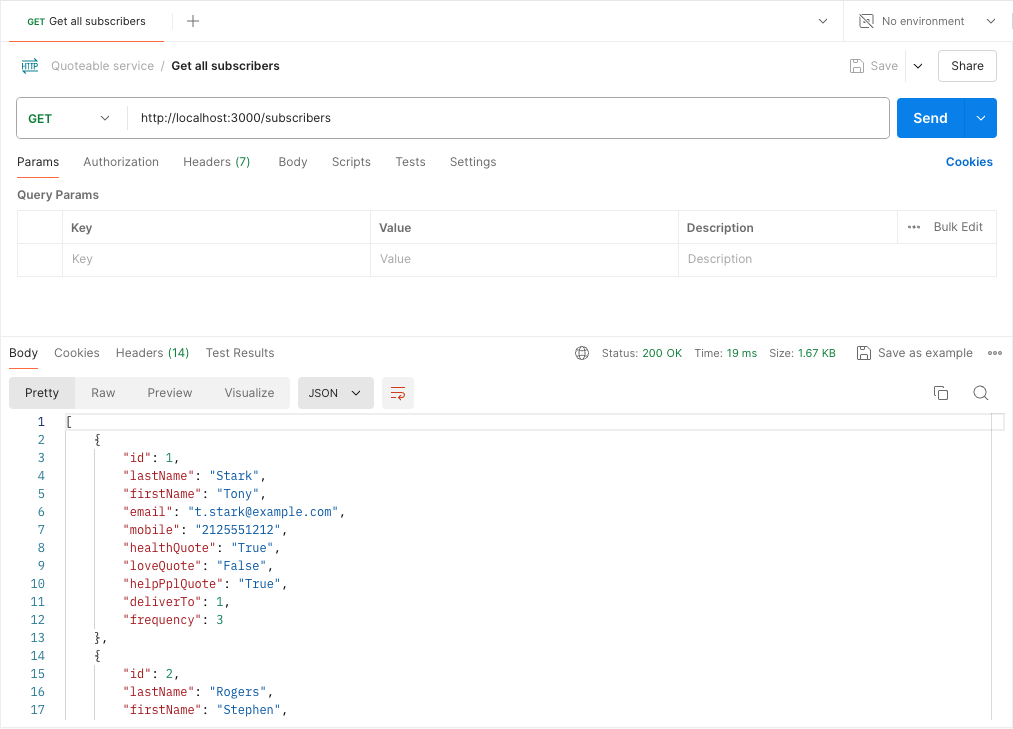
- Open Postman.
- Select the
GETmethod and enter the address:http://localhost:3000/subscribers. - Select Send. The response status is
200 OK, and the response body returns all Quoteable Service subscribers.
curl "http://localhost:3000/subscribers"
Next steps
Now that you have a basic understanding of how to use the Quoteable Service, you can explore the API reference for the subscribers resource and quotes resource. These topics introduce more detailed information on each endpoint, including request and response formats, error handling, and additional parameters.
Contact the support team if you have questions or need help.